 TopDissertations

What Is PRISMA 2020 — And Why Does It Matter For Your Dissertation?
PRISMA 2020 is the current standard for reporting systematic literature reviews. It stands for Preferred Reporting Items for Systematic Reviews and Meta-Analyses, and it consists of a 27-item checklist and a flow diagram template that document exactly how you found, screened, and selected your sources.
Here’s what most students get wrong right out of the gate: PRISMA is a reporting guideline, not a methodology tool. It doesn’t tell you how to conduct a literature review. It tells you how to report what you’ve already done. This distinction matters enormously because it means you can do your research independently — using whatever methodology your committee accepts — and still use PRISMA 2020 to document and present your work transparently.
Another critical point: PRISMA 2020 applies to ALL systematic reviews, not just meta-analyses. Despite the name including “meta-analysis,” the guidelines cover systematic reviews with narrative synthesis, qualitative evidence reviews, and scoping reviews (which use the PRISMA-ScR extension). This clarification removes a common source of student anxiety.
Why does this matter for your dissertation? Because high-impact journals now require completed PRISMA 2020 checklists at submission, and many committees expect it even at the dissertation level. Failing to follow PRISMA 2020 doesn’t just mean your paper looks sloppy — it can trigger desk rejection.
The official guidelines are hosted by the EQUATOR Network at prisma-statement.org, and they’re free to download. Let’s walk through what you need to do, step by step.
PRISMA 2020 vs 2009 — What Changed and Why It Matters
If your committee provided a PRISMA 2009 template, stop and use the 2020 version. The 2009 flow diagram is now obsolete, and editors will desk-reject manuscripts using it. The structural differences are significant.
PRISMA 2020 vs 2009 Comparison Table
| Feature | PRISMA 2009 | PRISMA 2020 | Why It Matters |
|---|---|---|---|
| Flow diagram structure | Single-track, linear model with four phases | Dual-track model with parallel identification and screening tracks | Better represents how systematic reviews actually handle multiple databases and study pools; accommodates separate tracks for study identification and literature screening |
| Checklist items | 21 items across six sections | 27 items across seven sections | Added protocol reporting, information sources detail, and data synthesis methods |
| Protocol reporting | Optional | Mandatory (Item 4) — must report whether a protocol exists, where it’s accessible (PROSPERO), and any amendments | Silence on protocol status is no longer acceptable |
| Information sources | Vague — “what databases were searched” | Detailed — must specify dates covered, language limits, grey literature inclusion | Enables reproducibility assessment |
| Study selection | Simple flow | Dual-track — separates records (database citations), reports (documents), and studies (investigations) | Accounts for multiple reports from a single study |
| AI tools documentation | Not addressed | New box — documents automation/ML tools used for deduplication (e.g., ASReview) | Reflects modern screening practices |
| GRADE assessment | Encouraged but not required | Required for every primary outcome | Every systematic review must now rate evidence certainty |
The key takeaway: If you’re using the 2009 flow diagram in 2026, you’re risking desk rejection. The redesign isn’t cosmetic — it reflects a fundamental understanding that systematic reviews involve multiple parallel tracks (records, reports, studies) rather than a single linear path.
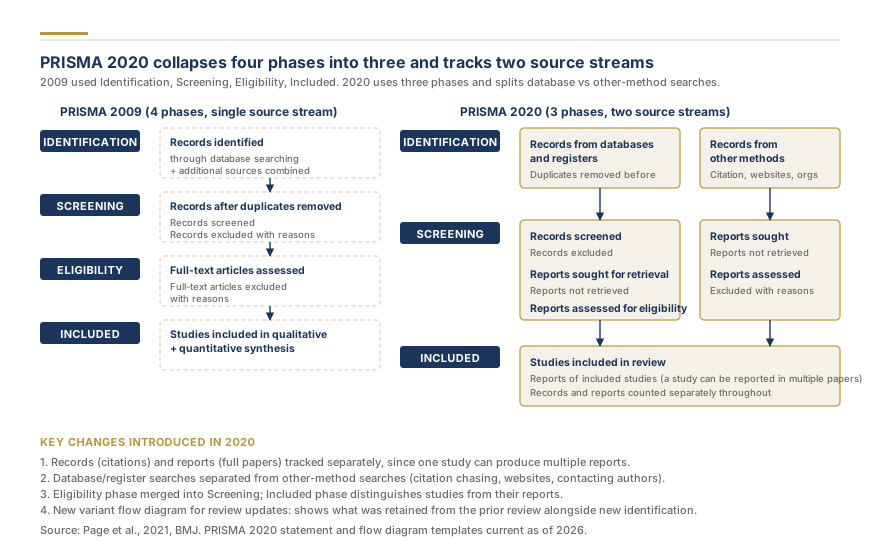
Source: PRISMA 2020 flow redesign — Attribution: Dr. James Whitfield / Research Gold
How to Create a PRISMA 2020 Flow Diagram (Step-by-Step)
The PRISMA flow diagram is the visual heart of your methodology chapter. It shows exactly how many records you found, how many you screened, and how many made it into your final review. The UNC LibGuides offers the most detailed practical walkthrough, and we’ve condensed their 10-step process here.
Step-by-Step Flow Diagram Process
Step 1: Define the Identification phase
In this phase, you list every database you searched. The PRISMA 2020 format uses a dual-track model:
IDENTIFICATION
├── Records identified from databases (num)
├── Records identified from other sources (num)
└── Total records before deduplication (sum)
Your databases should include discipline-specific sources. For health sciences, that’s PubMed/MEDLINE, Embase, and the Cochrane Library. For social sciences, it’s PsycINFO, Scopus, and Web of Science. If you’re unsure, consult your university librarian — it’s a 15-minute consultation that will dramatically improve your results.
Step 2: Remove duplicates and document with AI tools
PRISMA 2020 adds a specific box for automation and deduplication software. If you used EndNote, Zotero, or machine learning tools like ASReview, document them here. This isn’t just a detail — it’s now a required reporting element.
Step 3: Record the Screening phase
After deduplication, you have unique records. You screen these by title and abstract:
SCREENING
├── Records after deduplication (num)
├── Records screened by title/abstract (num)
└── Records excluded (num)
Your exclusion criteria should be stated upfront in your methodology chapter. Examples: “Studies published before 2015,” “non-peer-reviewed sources,” “studies not written in English.”
Step 5: Report Exclusion Reasons
PRISMA 2020 requires you to list the reasons for excluding studies at the full-text stage. Don’t just write “ineligibility” — specify why with counts. Examples: “Wrong study design (n = 42),” “Insufficient data for synthesis (n = 18),” “Language restrictions applied (n = 9).” This transparency lets reviewers assess your screening rigor.
Step 6: Track Full-Text Assessment
Records that pass screening go to full-text review:
INCLUDED
├──Reports retrieved for assessment (num)
├──Reports assessed for eligibility (num)
├──Reports excluded (num)
└──Excluded with reasons (list)
This is the most common place for errors. The PMC article (PMC7146040) identifies incorrect flow diagram numbers as one of the top five reporting mistakes students make. Every number must add up: records after deduplication → records screened → reports assessed → studies included. If your numbers don’t reconcile, your methodology chapter is unreliable.
Downloadable Templates
You don’t need to build the flow diagram from scratch. Both sources offer free downloadable templates:
- PRISMA 2020 flow diagram template — Editable Word format from the official PRISMA website
- UNC LibGuides flow diagram templates — Annotated templates with example numbers already populated
Use these as starting points. Adapt them to match your search strategy and database selection.
Completing the PRISMA 2020 Checklist (27 Items Explained)
The PRISMA 2020 checklist has 27 items across seven sections: title, abstract, introduction, methods, results, discussion, and funding. You’ll address these items throughout your methodology chapter. Here are the five most critical ones, with examples of how students should fill them out.
Item 4 — Protocol Registration (Now Mandatory)
PRISMA 2020 Item 4 requires you to report whether a protocol was prepared. Silence on this topic is no longer acceptable. If you registered your review with PROSPERO, provide the registration number. If you didn’t register, you must explain why.
What students do wrong: They omit this entirely, assuming it doesn’t matter.
What to do instead: “A protocol was prepared for this systematic review but was not registered with a public registry. The protocol is available upon request from the corresponding author.” Or: “This review was registered with PROSPERO (CRD number: XYZ123456).”
Item 6 — Information Sources
You must specify: which databases, which dates they cover, which filters you applied, and whether you included grey literature. Be precise.
Example: “PubMed (1966–2026), PsycINFO (1887–2026), and Scopus (2010–2026) were searched using the search strategies documented in the supplementary materials. No language restrictions were applied.”
Item 11 — Study Selection Process
Reference your flow diagram and explain the screening rationale. Two reviewers should independently screen titles/abstracts and full texts.
Example: “Two reviewers independently screened titles and abstracts. Disagreements were resolved by consensus. The flow diagram (Figure 1) shows the selection process in detail.”
Item 12 — Study Data Extraction
Document how data was extracted from included studies. Did you use a standardized form? Was there inter-rater reliability testing? Specify which data elements you extracted (e.g., sample size, study design, outcome measures, effect sizes) and justify your extraction approach. If multiple reviewers extracted data independently, document how disagreements were resolved.
Item 14 — Synthesis Methods and GRADE Assessment
This is where most students cut corners. PRISMA 2020 requires you to describe synthesis methods (meta-analysis or narrative synthesis) and must include GRADE certainty assessments for each primary outcome. Be explicit about whether you used random-effects or fixed-effects models, how you handled heterogeneity, and what synthesis methods were appropriate for your research question.
GRADE Assessment — How to Rate Your Evidence
GRADE stands for Grading of Recommendations Assessment, Development and Evaluation, and it’s now mandatory for every systematic review under PRISMA 2020. You rate the certainty of evidence for each primary outcome on a four-level scale: High, Moderate, Low, or Very Low.
The GRADE framework evaluates five domains that can lead to downgrades:
Downgrade Examples (With Concrete Student Mistakes)
| Domain | What It Means | Concrete Downgrade Example |
|---|---|---|
| Risk of bias | Methodological flaws in included studies | Three of five studies used convenience sampling rather than random assignment — downgrade by one level |
| Inconsistency | Conflicting results across studies | Study A found a 15% improvement; Study B found none. Heterogeneity I² = 65% — downgrade by one level |
| Indirectness | Population mismatch | Studies examined adult populations, but your research question targets children — downgrade by one level |
| Imprecision | Small sample size, wide confidence intervals | Total N = 142 across four studies; confidence intervals cross the null — downgrade by one level |
| Publication bias | Studies with positive results are more likely published | Funnel plot asymmetry suggests selective reporting — downgrade by one level |
What this means in practice: If three studies out of five are low-quality, your overall certainty is Low. If two studies are moderate quality, your certainty is Moderate. Students frequently omit this assessment entirely — and that omission is a documented desk-rejection trigger.
The Summary of Findings Table
PRISMA 2020 encourages a Summary of Findings table. It looks like this:
| Outcome | No. of Studies | Effect Size | Certainty |
|---|---|---|---|
| Academic performance improvement | 5 | +12% (CI: 8–16%) | Moderate |
| Student engagement | 3 | +8% (CI: 2–14%) | Low |
| Satisfaction ratings | 4 | +10% (CI: 5–15%) | Moderate |
Don’t skip this. It’s the evidence base for every conclusion you make.
Here’s a practical tip many students miss: start your GRADE assessment at “High” and downgrade as needed. The default starting point is High certainty, so you only move down when you encounter specific threats to validity. This approach prevents you from assuming “Moderate” or “Low” when the evidence is actually strong. If you’re using a systematic review tool (like Covidence), some extensions now integrate GRADE assessment directly into the workflow.
PRISMA Extensions — When You Need a Different Template
Not every review uses the standard PRISMA format. Depending on your methodology, you may need one of the PRISMA extensions:
| Extension | Full Name | When to Use It |
|---|---|---|
| PRISMA-S | Search strategies extension | When documenting your search methodology in detail. Gaining traction as journal requirements tighten on search documentation. |
| PRISMA-ScR | Scoping reviews extension | For scoping reviews (which systematically map the literature rather than synthesizing evidence). If you’re doing a scoping methodology, this is your template. |
| PRISMA-P | Protocols extension | When publishing your review protocol. Use this if you registered with PROSPERO or another registry. |
| PRISMA-NMA | Network meta-analyses | For network meta-analyses with multiple interventions and comparisons. |
All extensions are hosted at the EQUATOR Network alongside the main PRISMA guidelines. If your committee expects a specific extension, use it. When in doubt, stick with the main PRISMA 2020 checklist.
Common Mistakes Students Make (5-7 Specific Errors)
Peer-reviewed literature identifies the most common reporting mistakes in systematic reviews. Here are the specific errors students make and how to avoid them.
Mistake 1: Wrong Database Classification
What happens: Students call PubMed an “electronic database” without specifying its full name, coverage period, or discipline focus.
How to avoid it: Specify the full database name, coverage dates, and why you chose it. Example: “PubMed/MEDLINE (1966–present) was selected for its comprehensive biomedical indexing.” Source: PMC7146040.
Mistake 2: Inconsistent Search Aims
What happens: Students state one aim in their methods section but report different search parameters in the flow diagram.
How to avoid it: Ensure every number and parameter in your flow diagram matches what you stated in the methods. Your search aims should be consistent across all sections.
Mistake 3: Incorrect Flow Diagram Numbers
What happens: Numbers don’t add up. Records after deduplication doesn’t match records screened. Exclusion reasons are missing.
How to avoid it: Use the downloadable PRISMA 2020 template and populate each box with verified numbers. Run a simple check: start minus duplicates = records after deduplication = records screened.
Mistake 4: Missing Quality Assessment
What happens: Students skip the risk-of-bias assessment entirely, assuming it’s optional.
How to avoid it: Use a validated tool (Cochrane Risk of Bias, Newcastle-Ottawa Scale, or CASQ) to assess each included study’s quality. Document it in a table. This is not optional under PRISMA 2020.
Mistake 5: Wrong Publication Bias Tests
What happens: Students use funnel plots and Egger’s test (designed for meta-analyses) when they used narrative synthesis.
How to avoid it: Publication bias tests only apply when you’re doing a quantitative meta-analysis. If you used narrative synthesis, acknowledge this limitation instead of forcing an inappropriate test.
Mistake 6: Confusing Narrative Review With Systematic Review
What happens: Students write a narrative review (thematic synthesis without a search strategy) but present it as a systematic review.
How to avoid it: If you don’t have a documented search strategy, inclusion/exclusion criteria, and a PRISMA flow diagram, your work is a narrative review. Don’t label it a systematic review. Consult our literature review guide to build the proper framework.
Mistake 7: Omitting Protocol Registration
What happens: Students don’t report whether a protocol was prepared, even though PRISMA 2020 Item 4 requires it.
How to avoid it: Add a dedicated paragraph in your methods section addressing protocol status. If you used PROSPERO, include the registration number.
Other Essential Tools: PRESS Checklist and Search Validation
If you want to go beyond PRISMA and validate your search methodology, the PRESS checklist (Peer Review of Electronic Search Strategies) is the gold standard. It covers six domains:
- Translation of the research question into a search strategy
- Identification of relevant databases
- Use of keywords and controlled vocabulary
- Application of operators and filters
- Search syntax accuracy
- Appropriate use of database-specific filters
Beyond PRISMA, consider using tools that streamline the screening process. Covidence is a free web application for systematic reviews that integrates with your reference management software and automates duplicate detection. The PRISMA 2020 flow diagram generator from the official website provides editable templates you can adapt for your study.
A practical recommendation: You don’t need to master PRESS yourself. If your university has a research librarian, ask them to run the PRESS checklist on your search strategy. Librarian involvement correlates with higher-quality searches and stronger methodology chapters.
PRISMA 2020 Compliance Checklist for Your Dissertation
Before you submit your methodology chapter, verify these items:
- [ ] PRISMA 2020 flow diagram included (not 2009 version)
- [ ] All numbers in flow diagram reconcile and add up
- [ ] PRISMA 2020 27-item checklist completed (or addressed with justification)
- [ ] Protocol registration reported (PROSPERO number or explanation)
- [ ] GRADE certainty assessment included for each primary outcome
- [ ] Risk-of-bias assessment conducted using a validated tool
- [ ] Database names, dates, and inclusion criteria specified precisely
- [ ] Search strategy documented so another researcher could replicate it
- [ ] Downloadable template from prisma-statement.org adapted and included
Full checklist download: prisma-statement.org/prisma-2020-checklist
Summary + Next Steps
Here’s what you need to remember:
- PRISMA 2020 is a reporting guideline, not a methodology tool. Do your research first, then use PRISMA to document it.
- Use the 2020 flow diagram, not the 2009 version. The structural redesign is mandatory for peer-reviewed submissions.
- Complete all 27 checklist items. Protocol registration, GRADE assessment, and quality assessment are now required.
- Verify your flow diagram numbers. Inconsistent numbers are the single most common desk-rejection trigger.
If you’re overwhelmed by the PRISMA process: You don’t have to navigate it alone. TopDissertations’ how-it-works page shows exactly how our process connects qualified writers with students — including writers who specialize in methodology chapter development and systematic review documentation.
For expert assistance with your systematic review: Visit our order page to discuss your specific methodology requirements with a qualified writer. We offer direct writer communication, so you can ask about PRISMA compliance, GRADE assessment, or anything else before committing.
Related Guides
- Dissertation Literature Review Guide — Literature review methodology, PICO framework, and search documentation
- Methodology Chapter Writing Assistance — Complete methodology chapter guidance
- Introduction Chapter Writing Guide — How to frame your research question
- PhD Thesis Writing Guide — Comprehensive PhD thesis support
- Our Guarantees — What you can expect from our service
- Pricing Guide — Transparent pricing for academic writing support
Questions about PRISMA compliance for your specific discipline? Check our FAQ for common student questions about systematic review methodology, or reach out through our contact page. We respond within hours.
